If you read every day, the e-reader you carry matters more than most gadgets you own. It is the thing in your hand at breakfast, on the train, and in bed at night — so small frustrations, like a dim screen or a dead battery, add up fast. That is why the question of whether the Kindle Paperwhite Signature Edition is worth it comes up so often: Amazon’s top Paperwhite promises the same paper-like reading experience as the standard model, plus a handful of premium extras, and buyers want to know whether those extras are genuinely useful or just nice to have.
This article looks at the bundle version listed on this site — the Kindle Paperwhite Signature Edition with 32GB of storage, a fabric cover, and a wireless charging dock included. It is the 2024 (12th-generation) model, and everything below describes that version. (Amazon has since released a newer 2026 Signature Edition with an aluminum back and pogo-pin charging instead of Qi wireless charging; the features described here apply to the 2024 bundle.)
Below, we break down what the Signature Edition does better than the standard Paperwhite, where it falls short, who it suits best, and how it stacks up against the other reading options on RealTruePick — so you can decide before you buy.
Quick Verdict
The Kindle Paperwhite Signature Edition is worth it for people who read daily and want the most convenient version of Amazon’s best e-reader: the extra storage, auto-adjusting light, wireless charging, and ad-free lock screen remove small daily frictions that heavy readers notice. The one main caveat is that it reads exactly the same as the standard Paperwhite — the screen, the page turns, and the battery life are identical — so if you read casually and charge with a cable anyway, the standard model gives you the same books for less.
What Makes It Worth Considering?
A display that gets out of the way
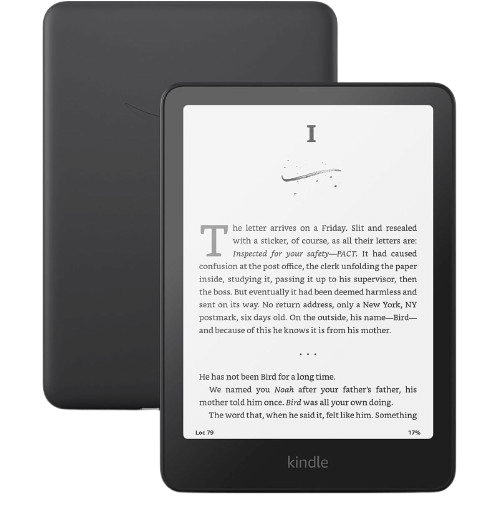
The 7-inch Paperwhite screen packs 300 pixels per inch with 16 levels of grayscale, and the 12th-generation panel has a higher contrast ratio and page turns that are about 25 percent faster than the previous generation. Text looks sharp and print-like, with no glare in bright light. An adjustable warm light shifts the screen toward amber in the evening, and a dark mode flips the page to white text on a black background for low-light reading. It is the kind of screen you stop noticing — which is exactly the point.
32GB of storage for a serious library
The Signature Edition doubles the standard Paperwhite’s storage to 32GB, room for thousands of books. That headroom matters most if you listen to Audible audiobooks or read graphic novels and comics, which take up far more space than plain text. It also means you can keep a large library downloaded for offline reading — on a plane, on a beach, or anywhere without Wi-Fi — instead of managing what to keep and what to delete.
An auto-adjusting front light
Where the standard Paperwhite asks you to set the brightness yourself, the Signature Edition adjusts its front light automatically to match the room around you. Move from a sunny window seat to a dim bedroom and the screen adapts without you digging through settings. It is a small convenience, but for people who read in different places throughout the day, it is one of the extras they notice most.
Wireless charging and weeks of battery
A single USB-C charge lasts up to 12 weeks based on Amazon’s estimate of half an hour of reading a day with wireless off and the light set low — in practice, most readers charge every few weeks rather than every few days. The Signature Edition also supports Qi wireless charging, and this bundle includes the Made for Amazon wireless charging dock, so you can simply drop the Kindle in its dock instead of plugging in a cable. A full charge takes under two and a half hours with a 9W USB power adapter.
Waterproof and genuinely portable
The Signature Edition carries an IPX8 waterproof rating, so an accidental splash or a drop in the bath does not end your reading session. At about 5 by 7 inches and roughly 214 grams, it is thin and light enough to hold one-handed for long stretches, and it slips into a jacket pocket or a small bag. The fabric cover in this bundle wakes the Kindle when you open it and puts it to sleep when you close it, so it is ready the moment you are.
An ad-free lock screen
On the standard Paperwhite’s base configuration, the lock screen shows sponsored recommendations. The Signature Edition comes ad-free by default, so your lock screen shows the cover of the book you are currently reading instead. It is a cosmetic difference, but it makes the device feel like yours rather than a billboard.
What Could Be Better?
The reading experience is the same as the standard model. The Signature Edition’s screen, page-turn speed, and battery life are identical to the standard Paperwhite. You are paying for storage, lighting automation, wireless charging, and an ad-free lock screen — not for sharper text or a better display.
There are no physical page-turn buttons. Everything is touch and swipe. Readers who liked the old Kindle Oasis, or who read one-handed in bed, often miss a button to turn the page. The newer 2026 Signature Edition addresses this with an optional button cover, but that accessory does not fit this 2024 model.
The auto-adjusting light is not always right. Some readers find the automatic brightness a little inconsistent — occasionally too dim in a dark room or too bright at night — and end up adjusting it manually anyway. If you mostly read in one place with steady lighting, the feature adds little.
32GB is more than most readers need. For plain ebooks, 16GB already holds thousands of titles. The extra storage only earns its keep if you download a lot of audiobooks or graphic-heavy books. And without its cover, the screen can wake accidentally in a bag, so the included cover is more necessity than bonus. Finally, listening to Audible over Bluetooth drains the battery noticeably faster than reading alone, and there is no headphone jack or built-in speaker — audio goes through Bluetooth headphones or a speaker.
Who It’s For / Who Should Skip It
It is a great fit if you read every day, especially in different places and lighting; if you listen to Audible audiobooks and want room to keep them downloaded; if you read in the bath or by the pool; or if you are upgrading from an older Kindle and want the most refined Paperwhite Amazon makes. The wireless charging dock in this bundle also suits readers who like to keep the Kindle topped up on a nightstand without cables.
Skip it if you read a few times a week and mostly in one spot — the standard Paperwhite gives you the same screen and the same books. Skip it too if physical page-turn buttons are a must-have, or if you do most of your reading on a tablet or phone and only want an e-reader as a backup. In those cases, the premium buys conveniences you are unlikely to notice.
How It Compares to Other Options on RealTruePick
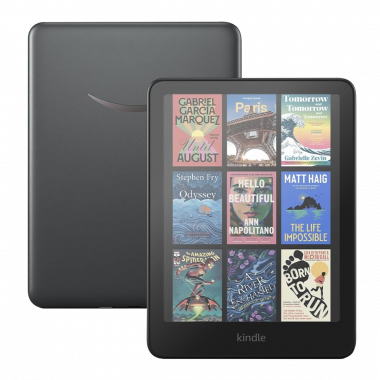
If you want color, the Kindle Colorsoft Signature Edition on this site is the closest alternative: it shares the 32GB of storage, the auto-adjusting light, and wireless charging, but adds a color display for comics, magazines, and book covers — at the cost of a shorter battery life than this black-and-white Paperwhite. For readers who mainly read novels, the Paperwhite’s longer battery and sharper text contrast make it the better pick; for visual reading, the Colorsoft is the one to consider.
A tablet like the Apple iPad 11-inch is a different kind of alternative: it does far more than an e-reader — apps, video, web browsing, and color — but it is heavier, needs charging far more often, and comes with all the distractions of a general-purpose screen. If reading is the job, a dedicated e-reader still wins on comfort and battery; if you want one device that does everything, the tablet makes more sense.
FAQ
Is the Kindle Paperwhite Signature Edition worth it over the standard Paperwhite?
It depends on how you read. The two share the same screen, waterproofing, and battery life, so the Signature Edition is worth it if you value its extras: double the storage, wireless charging, an auto-adjusting front light, and an ad-free lock screen. If none of those matter to you, the standard Paperwhite delivers the same reading experience for less.
Does this bundle include the wireless charging dock?
Yes. The bundle listed on this site includes the Kindle Paperwhite Signature Edition, a fabric cover, and the Made for Amazon wireless charging dock. Note that if you buy the Signature Edition on its own, the dock is sold separately — and the newer 2026 Signature Edition uses a pogo-pin charging stand instead of Qi wireless charging, so its dock is a different accessory.
How long does the battery really last?
Amazon rates a single charge at up to 12 weeks, based on half an hour of reading a day with wireless off and the light set low. Real-world life varies with brightness and wireless use, but most readers go weeks between charges. Streaming Audible audiobooks over Bluetooth shortens battery life noticeably, so audiobook-heavy readers should expect to charge more often.
Is the Kindle Paperwhite Signature Edition waterproof?
Yes. It is rated IPX8, which means it can survive accidental immersion in fresh water. That makes it safe for reading in the bath or by the pool, though it is not designed for salt water or chlorinated pools, and the USB-C port should be dry before charging.
Can I listen to Audible audiobooks on it?
Yes, over Bluetooth. The Signature Edition pairs with wireless headphones or a speaker to play Audible audiobooks, and its 32GB of storage leaves plenty of room to keep them downloaded. There is no built-in speaker and no headphone jack, so Bluetooth audio is the only option.
As an Amazon Associate I earn from qualifying purchases.